AI Agent Prompt Wizard: Perfect Voice Calls with Precision Configuration
🧙♂️ AI Agent Prompt Wizard: Perfect Voice Calls with Precision Configuration
Writing AI agent prompts for voice calls is one of the most challenging aspects of building conversational AI. Unlike text-based chatbots, voice AI requires precision across 15+ critical parameters — from language settings and tone to emotional expressions and safety protocols. Miss even one parameter, and your agent could sound robotic, misunderstand context, or fail to handle edge cases properly.
Suarify's Agent Prompt Wizard eliminates this complexity by guiding you through every essential parameter in a structured, step-by-step process. With 15 comprehensive steps and AI-powered auto-completion, you can create perfectly configured voice agents without missing critical details or spending hours on trial and error.This guide shows you why precision matters in voice AI configuration and how Suarify's wizard ensures your agents are perfectly tuned for natural, effective voice conversations.
🎯 Why Writing Voice AI Prompts Is So Daunting
The Complexity of Voice AI Configuration
Voice AI agents require far more configuration than text-based bots: Text Chatbots Need:- Basic personality
- Response templates
- Simple conversation flow
Voice AI Agents Need:- Language settings and guidelines
- Identity and role definition
- Task and objective clarity
- Demeanor and personality
- Tone and conversation style
- Enthusiasm levels
- Formality levels
- Emotional expressions
- Filler words and natural speech
- Pacing and speed instructions
- Instruction following protocols
- Safety and escalation rules
- Tool integration (CRM, APIs, databases)
- Multi-emotion transitions
- Cultural context and respect
That's 15+ parameters that all need to be precisely configured.What Gets Left Out (And Why It Matters)
When configuring voice agents manually, critical parameters are often overlooked:
Commonly Missed Parameters:1. Language Guidelines: Without proper constraints, agents switch languages mid-conversation
2. Emotional Expressions: Missing emotional intelligence makes agents sound robotic
3. Pacing Instructions: Wrong pacing makes conversations feel rushed or sluggish
4. Safety Protocols: Missing escalation rules can lead to poor customer experiences
5. Tool Integration: Forgetting to configure tools limits agent capabilities
6. Instruction Following: Without clear protocols, agents misunderstand or ignore instructions
7. Filler Words: Missing natural speech patterns makes agents sound artificial
8. Multi-Emotion Transitions: Lack of emotional depth reduces engagement
The Impact of Missing Parameters:- Poor User Experience: Robotic, unnatural conversations
- Misunderstandings: Agents fail to grasp context or intent
- Safety Issues: No escalation for frustrated or at-risk callers
- Limited Functionality: Agents can't access necessary tools or data
- Inconsistent Quality: Different agents behave differently
- Low Engagement: Callers hang up or become frustrated
✨ How Suarify's Wizard Solves Everything
The 15-Step Comprehensive Wizard
Suarify's Agent Prompt Wizard guides you through every critical parameter:
Step-by-Step Configuration
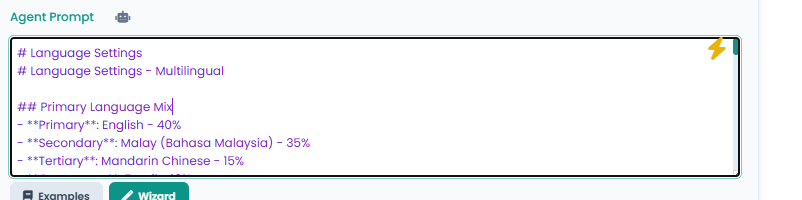
Step 1: Language Setting- Choose primary language (English, Malay, Mandarin, Tamil, etc.)
- Configure multilingual support
- Set language percentages for mixed-language conversations
 .png)
Step 2: Language Guidelines
.png)
Step 2: Language Guidelines
- Lock output to chosen language to prevent accidental switching
- Configure code-switching behavior
- Set cultural context and respect guidelines
 .png)
Step 3: Identity (Role & Objective)
.png)
Step 3: Identity (Role & Objective)
- Define who the agent is
- Set clear objectives and "done" criteria
- Establish role and expertise level
 .png)
Step 4: Task
.png)
Step 4: Task
- Specify primary tasks (customer inquiries, support, scheduling, etc.)
- Define task scope and boundaries
- Set task completion criteria
 .png)
Step 5: Demeanor (Reduce Repetition)
.png)
Step 5: Demeanor (Reduce Repetition)
- Choose demeanor (patient, upbeat, serious, empathetic, calm, enthusiastic)
- Add variety to reduce robotic phrasing
- Use synonyms and alternative expressions
 .png)
Step 6: Tone (Personality & Tone)
.png)
Step 6: Tone (Personality & Tone)
- Set conversational tone (warm, concise, confident, friendly, etc.)
- Define personality characteristics
- Configure response length and style
 .png)
Step 7: Level of Enthusiasm
.png)
Step 7: Level of Enthusiasm
- Choose enthusiasm level (highly enthusiastic, calm, moderate, low-key, energetic, balanced)
- Match energy to conversation context
- Balance engagement with professionalism
 .png)
Step 8: Level of Formality
.png)
Step 8: Level of Formality
- Set formality level (professional, casual, semi-formal, very formal, relaxed, business casual)
- Match formality to context and audience
- Use appropriate language and titles
 .png)
Step 9: Level of Emotion
.png)
Step 9: Level of Emotion
- Choose emotional tone (compassionate, matter-of-fact, expressive, neutral, warm, reserved)
- Balance emotional expression with professionalism
- Match emotions to conversation context
 .png)
Step 10: Emotional Expressions (Multi-Emotion)
.png)
Step 10: Emotional Expressions (Multi-Emotion)
- Configure realistic emotional expressions (laugh, cry, transitions)
- Set multi-emotion sequences (start happy → midway sad → end angry)
- Add natural emotional depth to conversations
 .png)
Step 11: Filler Words
.png)
Step 11: Filler Words
- Configure natural speech patterns (none, occasionally, often, very often)
- Add "um," "uh," "hm" for natural conversation flow
- Balance naturalness with clarity
 .png)
Step 12: Pacing (Speed Instructions)
.png)
Step 12: Pacing (Speed Instructions)
- Set speaking speed (fast, moderate, slow, natural, quick but clear, relaxed)
- Tune speaking style independent of client playback speed
- Match pacing to conversation urgency
 .png)
Step 13: Instructions (Instruction Following)
.png)
Step 13: Instructions (Instruction Following)
- Configure handling of unclear audio and background sounds
- Set protocols for repeating back information
- Define clarification and confirmation procedures
 .png)
Step 14: Safety & Escalation
.png)
Step 14: Safety & Escalation
- Define when to escalate to human (safety risks, user requests, dissatisfaction, tool failures)
- Set escalation messages and protocols
- Configure behavioral adjustments based on user mood
 .png)
Step 15: Tools (CRM, APIs, Database)
.png)
Step 15: Tools (CRM, APIs, Database)
- Configure tool integration (CRM, APIs, databases, calendar, payment, email/SMS)
- Set tool selection criteria
- Define tool call preambles and error handling
 .png)
.png)
🤖 AI-Powered Auto-Complete Feature
Intelligent Prompt Generation
Suarify's AI auto-complete takes the wizard to the next level: How It Works:1. Start the Wizard: Click "Wizard" in the Agent Prompt section
2. AI Analyzes Context: AI reviews your agent name, industry, and purpose
3. Auto-Fills Steps: AI suggests optimal configurations for each step
4. Review and Customize: You can accept, modify, or override AI suggestions
5. Generate Perfect Prompt: Final prompt is generated with all parameters included
What AI Auto-Complete Covers:- Language Settings: Suggests appropriate languages based on your market
- Tone & Personality: Recommends tone based on industry and use case
- Emotional Expressions: Suggests appropriate emotional range
- Safety Protocols: Includes industry-standard escalation rules
- Tool Integration: Recommends relevant tools based on agent purpose
- Cultural Context: Adds appropriate cultural sensitivity
Benefits:- 90% Time Reduction: From hours to minutes
- Zero Missing Parameters: AI ensures everything is covered
- Best Practices Built-In: AI suggests proven configurations
- Customizable: You maintain full control to adjust as needed
💡 Why Precision Matters: The Impact of Each Parameter
Language Settings: Foundation of Communication
Why It Matters:- Wrong Language: Agents switch languages mid-conversation, confusing callers
- No Guidelines: Agents can't maintain language consistency
- Missing Cultural Context: Agents offend or misunderstand cultural nuances
With Precision:- Consistent language throughout conversation
- Natural code-switching when appropriate
- Cultural respect and appropriate greetings
Tone & Personality: The Voice of Your Brand
Why It Matters:- Wrong Tone: Agents sound robotic, unprofessional, or inappropriate
- Inconsistent Personality: Different agents behave differently
- Mismatched Energy: Too enthusiastic or too reserved for context
With Precision:- Brand-consistent personality across all agents
- Appropriate tone for every situation
- Natural, engaging conversations
Emotional Expressions: Human-Like Interactions
Why It Matters:- No Emotions: Agents sound robotic and unrelatable
- Wrong Emotions: Inappropriate emotional responses damage relationships
- Missing Transitions: Abrupt emotional changes feel unnatural
With Precision:- Natural emotional expressions that build rapport
- Appropriate emotional responses to context
- Smooth emotional transitions throughout conversations
Pacing & Filler Words: Natural Speech Patterns
Why It Matters:- Wrong Pacing: Conversations feel rushed or sluggish
- No Filler Words: Speech sounds too perfect and artificial
- Inconsistent Speed: Callers struggle to follow or become impatient
With Precision:- Natural conversation speed that feels human
- Appropriate use of filler words for authenticity
- Pacing that matches conversation urgency
Safety & Escalation: Protecting Your Business
Why It Matters:- No Escalation Rules: Frustrated callers can't reach humans
- Missing Safety Protocols: At-risk situations aren't handled properly
- Poor Error Handling: Tool failures cause conversation breakdowns
With Precision:- Automatic escalation for appropriate situations
- Safety protocols for at-risk callers
- Graceful error handling and recovery
Tool Integration: Extending Agent Capabilities
Why It Matters:- No Tool Access: Agents can't look up customer data or process requests
- Missing Integration: Manual work required for simple tasks
- Poor Tool Selection: Agents use wrong tools or fail to use available ones
With Precision:- Seamless access to CRM, databases, and APIs
- Automatic tool selection based on context
- Complete functionality without manual intervention
🚀 Benefits of Using the Wizard
Benefit 1: Complete Configuration
Manual Configuration: Easy to miss critical parameters Wizard-Guided: Every parameter is covered systematically Result: 100% parameter coverage, no missing configurationsBenefit 2: Best Practices Built-In
Manual Configuration: Trial and error to find what works Wizard-Guided: Best practices from OpenAI Realtime Guide included Result: Professional-grade agents from the startBenefit 3: Time Efficiency
Manual Configuration: 4-8 hours per agent Wizard-Guided: 15-20 minutes per agent Time Saved: 95% reduction in configuration timeBenefit 4: Consistency
Manual Configuration: Different agents configured differently Wizard-Guided: Consistent structure across all agents Result: Uniform quality across your entire agent fleetBenefit 5: AI-Powered Intelligence
Manual Configuration: Human guesswork and experimentation Wizard-Guided: AI suggests optimal configurations Result: Better performance through intelligent recommendationsBenefit 6: Easy Updates
Manual Configuration: Difficult to update, easy to break Wizard-Guided: Update any step, regenerate prompt instantly Result: Rapid iteration and continuous improvement📊 Real-World Impact
Case Study 1: Customer Service Agent
Before Wizard:- Missing language guidelines → Agent switched languages mid-call
- No escalation rules → Frustrated customers couldn't reach humans
- Wrong tone → Agent sounded robotic and unhelpful
- Result: 40% customer dissatisfaction, high escalation rate
After Wizard:- Complete language configuration → Consistent language throughout
- Proper escalation rules → Smooth handoff to humans when needed
- Appropriate tone → Warm, helpful, professional conversations
- Result: 85% customer satisfaction, 60% reduction in escalations
Case Study 2: Sales Agent
Before Wizard:- Missing emotional expressions → Agent sounded too robotic
- No pacing instructions → Conversations felt rushed
- Incomplete tool integration → Couldn't access customer data
- Result: 30% conversion rate, low engagement
After Wizard:- Natural emotional expressions → Engaging, relatable conversations
- Appropriate pacing → Comfortable conversation speed
- Full tool integration → Access to CRM and customer history
- Result: 65% conversion rate, 2x higher engagement
Case Study 3: Support Agent
Before Wizard:- No instruction following protocols → Misunderstood customer requests
- Missing safety protocols → At-risk situations not handled properly
- Incomplete task definition → Agent didn't know when task was "done"
- Result: 50% first-call resolution, safety concerns
After Wizard:- Clear instruction protocols → Accurate understanding of requests
- Comprehensive safety rules → Proper handling of all situations
- Well-defined tasks → Clear completion criteria
- Result: 80% first-call resolution, zero safety incidents
🎯 Getting Started: Your First Wizard-Configured Agent
Ready to create a perfectly configured voice agent? Here's your quick start:
Step 1: Access the Wizard (30 seconds)
1. Navigate to Agent Configuration
2. Click "Wizard" button in the Agent Prompt section
3. Wizard opens with Step 1 of 15
Step 2: Use AI Auto-Complete (Optional, 2 minutes)
1. Let AI analyze your agent context
2. Review AI suggestions for each step
3. Accept, modify, or override as needed
4. AI ensures no parameters are missed
Step 3: Complete Wizard Steps (15-20 minutes)
1. Steps 1-3: Language and Identity (Foundation)
2. Steps 4-6: Task, Demeanor, and Tone (Personality)
3. Steps 7-9: Enthusiasm, Formality, Emotion (Expression)
4. Steps 10-12: Multi-Emotion, Filler Words, Pacing (Naturalness)
5. Steps 13-15: Instructions, Safety, Tools (Functionality)
Step 4: Generate and Deploy (1 minute)
1. Click "Done - Generate Prompt"
2. Review generated prompt
3. Save agent configuration
4. Start using immediately
Total Time: 15-20 minutes Manual Configuration Equivalent: 4-8 hours💬 The Bottom Line
Suarify's Agent Prompt Wizard eliminates every barrier to creating perfect voice AI agents:- ❌ No missing parameters → ✅ 15 comprehensive steps cover everything
- ❌ No guesswork → ✅ Best practices built into every step
- ❌ No hours of configuration → ✅ 15-20 minutes with wizard guidance
- ❌ No inconsistent quality → ✅ Structured process ensures uniformity
- ❌ No trial and error → ✅ AI auto-complete suggests optimal configurations
- ❌ No difficult updates → ✅ Update any step, regenerate instantly
The outcome? Perfectly configured voice AI agents with precision across every parameter — language, tone, emotion, pacing, safety, and tools — all configured correctly from the start.Whether you're building customer service agents, sales representatives, or support specialists, Suarify's Agent Prompt Wizard ensures your agents are perfectly tuned for natural, effective, and safe voice conversations.
Start using the wizard today: suarify.my/platform---
*Ready to create perfect voice AI agents? Use Suarify's Agent Prompt Wizard and experience the difference that precision configuration makes in voice conversations.*