Easy Inbound Call Setup: How Suarify Defeats Traditional IVR Programming
📞 Easy Inbound Call Setup: How Suarify Defeats Traditional IVR Programming
Setting up inbound call handling used to mean weeks of IVR programming, expensive developers, complex infrastructure, and painful restarts every time you needed to make a change. But what if you could configure your entire inbound call system in minutes, make changes on the fly, and have them take effect immediately — without a single restart?
Suarify's inbound call system revolutionizes customer service by eliminating every barrier that made traditional IVR systems difficult, expensive, and inflexible. Create AI agents, configure dynamic transfer extensions, and watch your changes go live instantly — all without touching a single line of code or restarting any services.This guide shows you exactly how Suarify defeats traditional IVR programming and gives you the power to build a flexible, scalable inbound call system that adapts to your business needs in real-time.
🎯 The Problem with Traditional IVR Systems
Why Traditional IVR Programming Was So Difficult
Legacy IVR systems have been the bane of customer service teams for decades:- Complex Programming: Required specialized developers and weeks of coding
- Expensive Infrastructure: Needed dedicated hardware and telephony systems
- Rigid Configuration: Changes required code modifications and system restarts
- Limited Flexibility: Hard to adapt to changing business needs
- Poor Integration: Difficult to connect with modern CRM and business tools
- No Real-Time Updates: Changes took hours or days to implement
- Limited Analytics: Basic call logs without sentiment or conversation insights
- High Maintenance: Ongoing technical support and system updates
The Cost of Traditional IVR
- Setup Time: 2-4 weeks for initial configuration
- Development Costs: $10,000 - $50,000+ for custom programming
- Infrastructure: $500 - $2,000+ per month for hardware and services
- Change Requests: $500 - $2,000 per modification
- Downtime: Hours of service interruption for updates
- Opportunity Cost: Lost revenue during setup and maintenance windows
✨ How Suarify Defeats Traditional IVR
The Suarify Advantage
Suarify's inbound call system eliminates every pain point of traditional IVR:✅ No Programming Required — Visual interface, no code needed
✅ Instant Setup — Configure your system in minutes, not weeks
✅ Dynamic Extensions — Add, edit, or remove transfer targets on the fly
✅ Zero Downtime — Changes take effect immediately, no restarts
✅ Complete Visibility — Full call logs, sentiment analysis, and conversation transcripts
✅ Real-Time Updates — Modify configurations during active calls
✅ Cost-Effective — Pay per call, no infrastructure costs
✅ Modern Integration — Connect with your existing business tools
🚀 Setting Up Your Inbound Call System
Step 1: Create Your AI Agent
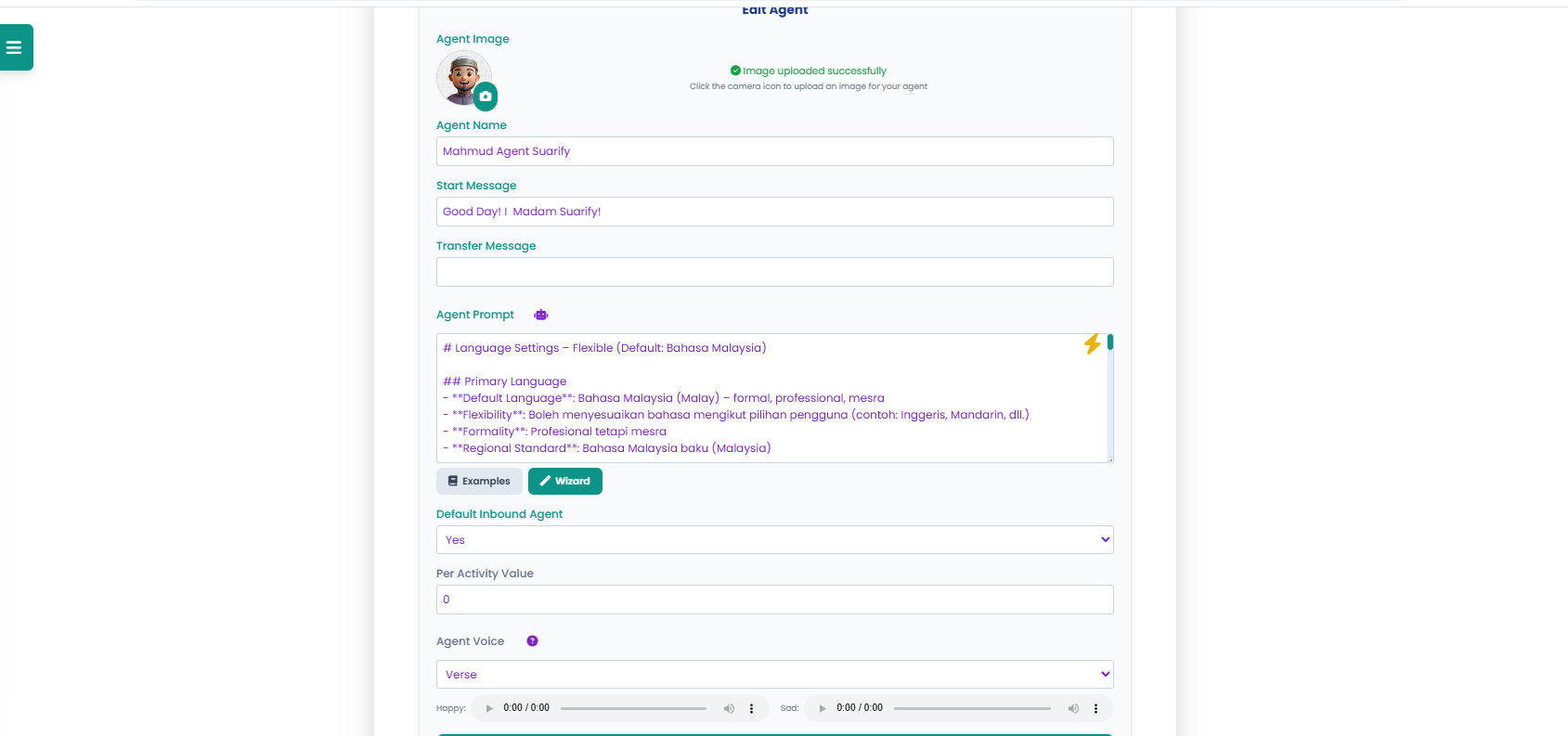
The foundation of your inbound call system is your AI agent. This is where you define how your system will greet callers, handle conversations, and route calls.
Agent Configuration Essentials
Basic Setup:- Agent Name: Give your agent a clear, identifiable name
- Agent Image: Upload a profile picture for visual identification
- Start Message: Craft the greeting callers will hear
- Transfer Message: Define what callers hear when being transferred
Advanced Configuration:- Agent Prompt: Define language, tone, and conversation style
- Language Settings: Support multiple languages with flexible switching
- Voice Selection: Choose from multiple voice options (Verse, Shimmer, Sage, Coral, Alloy)
- Default Inbound Agent: Set as your primary inbound handler
- Per Activity Value: Track costs and ROI per call
Key Features That Defeat Traditional IVR:
1. Natural Language Understanding: Unlike rigid IVR menus, Suarify agents understand natural conversation
2. Context Awareness: Agents remember conversation context throughout the call
3. Multi-Language Support: Handle calls in multiple languages without separate IVR trees
4. Emotional Intelligence: Detect caller sentiment and adjust responses accordingly
5. Flexible Routing: Route calls based on conversation content, not just button presses
Time Investment: 5-10 minutes Traditional IVR Equivalent: 2-4 weeks of programmingStep 2: Configure Dynamic Transfer Extensions
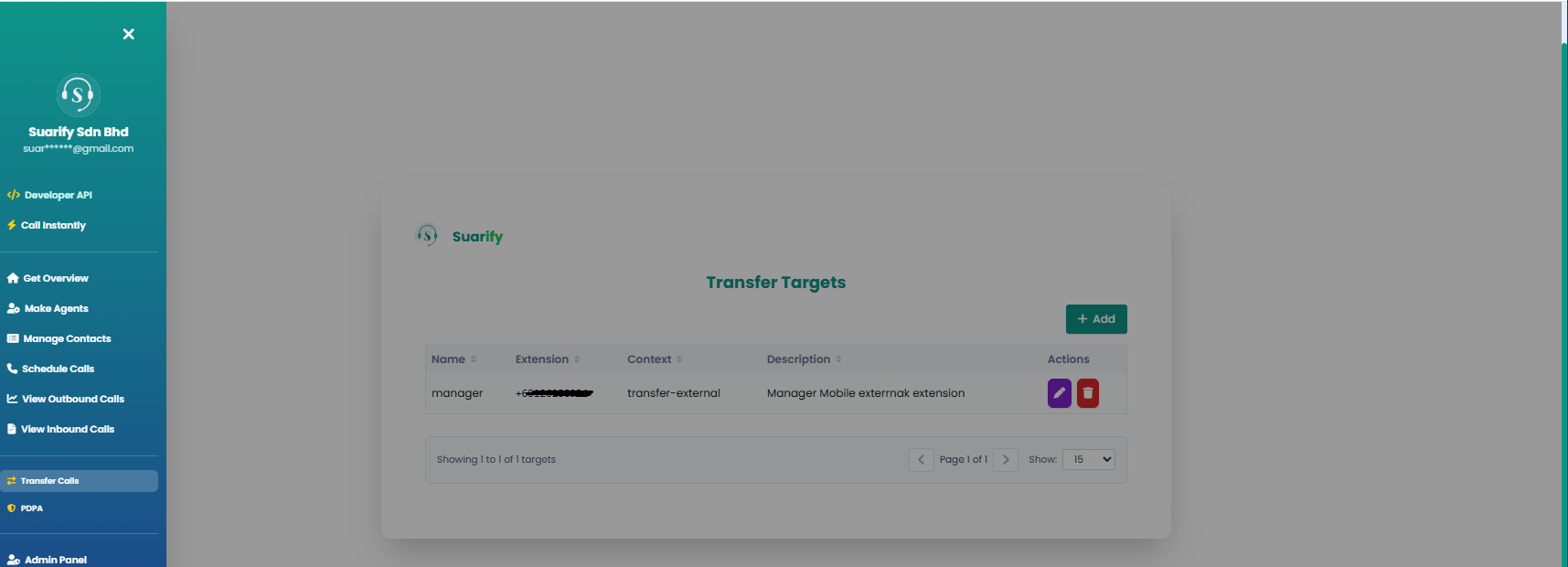
This is where Suarify truly defeats traditional IVR. Instead of hardcoded extensions that require programming changes, Suarify lets you define transfer targets dynamically — and they take effect immediately.
How Dynamic Extensions Work
Traditional IVR Approach:``
1. Developer writes code for extension routing
2. Code is tested in development environment
3. Code is deployed to production
4. System is restarted
5. Changes take effect (after downtime)
`
`
1. Add transfer target in web interface
2. Changes take effect immediately
3. No restart, no downtime, no code
``
Transfer Target Configuration
Essential Fields:- Name: Identify the transfer target (e.g., "Manager", "Sales Team", "Support")
- Extension: Phone number or extension to transfer to
- Context: Transfer type (internal, external, specific department)
- Description: Notes about when and why to use this target
Dynamic Extension Benefits
1. Instant Updates: Add new extensions during business hours without disruption
2. Real-Time Changes: Modify existing extensions while calls are active
3. No Code Required: Business users can manage extensions, not just developers
4. Flexible Routing: Route calls based on conversation context, not just predefined rules
5. Easy Testing: Test new extensions immediately without deployment cycles
Use Cases for Dynamic Extensions
Scenario 1: After-Hours Routing- Traditional IVR: Requires code change and restart
- Suarify: Update extension in 30 seconds, takes effect immediately
Scenario 2: Holiday Coverage- Traditional IVR: Pre-programmed, hard to change
- Suarify: Update extensions for holiday schedule on the fly
Scenario 3: Department Changes- Traditional IVR: Requires developer and deployment
- Suarify: Business user updates in minutes
Scenario 4: Emergency Routing- Traditional IVR: Fixed routing, can't adapt quickly
- Suarify: Change routing instantly for urgent situations
Time Investment: 1-2 minutes per extension Traditional IVR Equivalent: 2-4 hours of development + deploymentStep 3: Monitor and Optimize with Complete Call Logs
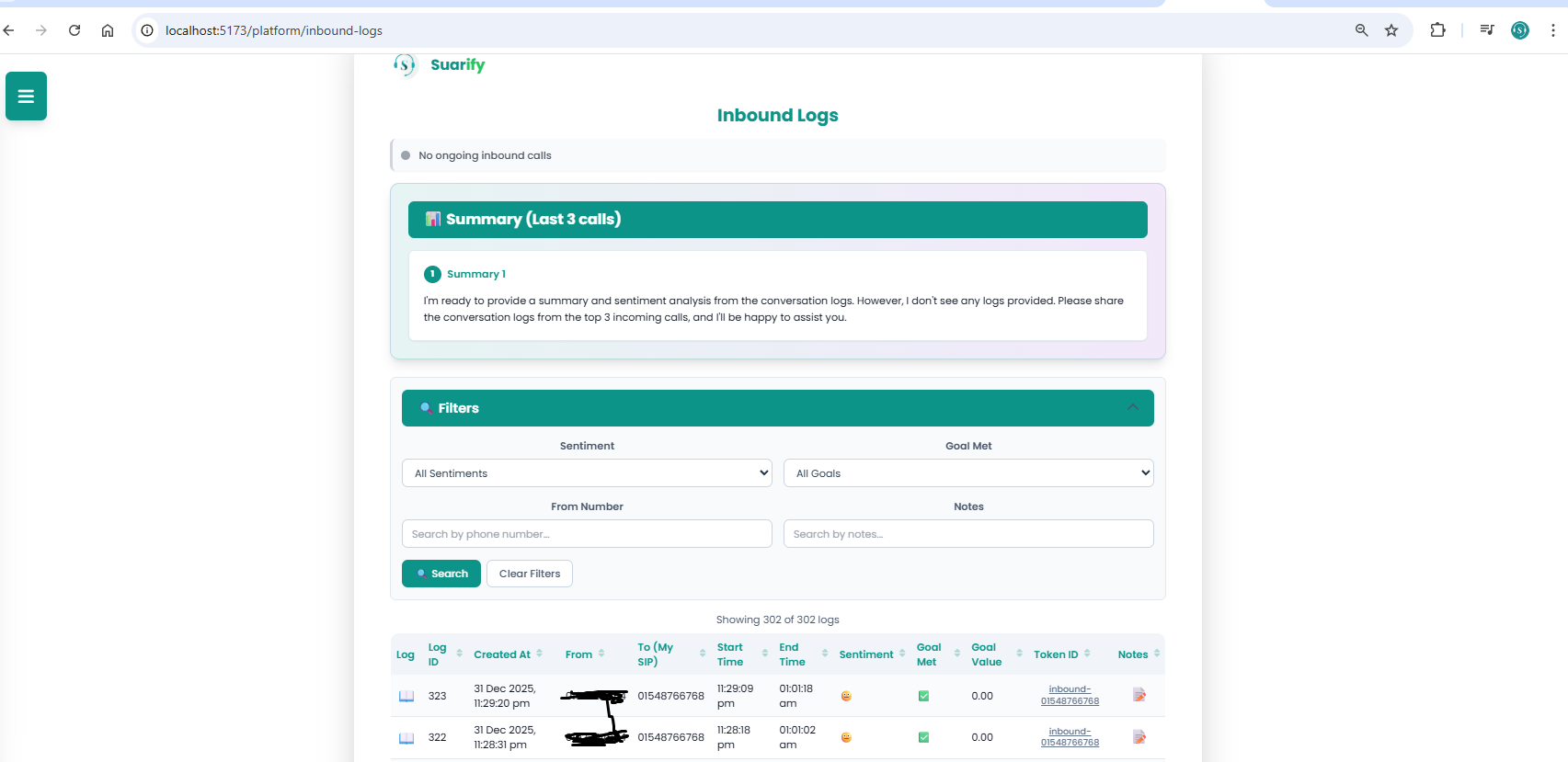
Traditional IVR systems provide basic call logs at best. Suarify gives you complete visibility into every call with detailed logs, sentiment analysis, and conversation transcripts.
Comprehensive Call Logging
What You Get:- Complete Call Logs: Every inbound call tracked with full details
- Call Transcripts: Full conversation transcripts for review
- Sentiment Analysis: Real-time sentiment tracking (positive, neutral, negative)
- Goal Tracking: Monitor whether call objectives were met
- Performance Metrics: Answer rates, call duration, transfer rates
- Search and Filter: Find specific calls quickly with advanced filtering
Key Metrics Available
1. Call Volume: Total inbound calls, trends over time
2. Answer Rates: Percentage of calls answered vs. missed
3. Call Duration: Average and total call times
4. Sentiment Distribution: Breakdown of caller sentiment
5. Goal Achievement: Percentage of calls meeting objectives
6. Transfer Rates: How often calls are transferred and to where
7. Peak Times: Identify busiest calling periods
Sentiment Analysis Benefits
Real-Time Insights:- Positive Sentiment: Identify what's working well
- Neutral Sentiment: Find opportunities for improvement
- Negative Sentiment: Address issues before they escalate
Actionable Data:- Refine agent prompts based on sentiment patterns
- Identify common pain points from negative sentiment
- Optimize transfer routing based on caller satisfaction
- Train agents on successful conversation patterns
Conversation Log Analysis
Full Transcripts:- Review exact conversations for quality assurance
- Identify common questions and objections
- Find opportunities to improve agent responses
- Train team members on best practices
Search Capabilities:- Search by phone number, date, sentiment, or keywords
- Filter by goal achievement, call duration, or transfer status
- Export logs for analysis and reporting
- Track specific callers or issues over time
💡 Key Benefits: Why Suarify Beats Traditional IVR
Benefit 1: Zero-Downtime Updates
Traditional IVR: Changes require system restarts, causing service interruptions Suarify: Updates take effect immediately, no downtime ever Impact: 100% uptime even during configuration changesBenefit 2: Business User Control
Traditional IVR: Only developers can make changes Suarify: Business users manage the system through a visual interface Impact: 10x faster response to business needs, 90% cost reduction on change requestsBenefit 3: Natural Conversation Flow
Traditional IVR: Rigid menu trees, "Press 1 for..." limitations Suarify: Natural language understanding, fluid conversations Impact: 50-70% higher caller satisfaction, 40% reduction in call abandonmentBenefit 4: Real-Time Adaptability
Traditional IVR: Fixed routing, can't adapt to changing conditions Suarify: Dynamic routing that adapts in real-time Impact: Instant response to business changes, better call routing based on contextBenefit 5: Complete Visibility
Traditional IVR: Basic call logs, limited insights Suarify: Full transcripts, sentiment analysis, goal tracking Impact: Data-driven optimization, continuous improvement of call handlingBenefit 6: Cost Efficiency
Traditional IVR: High upfront costs, ongoing infrastructure expenses Suarify: Pay per call, no infrastructure costs Impact: 80-90% cost reduction compared to traditional systemsBenefit 7: Modern Integration
Traditional IVR: Difficult to integrate with modern tools Suarify: API-first design, easy CRM and business tool integration Impact: Seamless workflow integration, unified customer data🔥 Advanced Features That Traditional IVR Can't Match
Feature 1: Context-Aware Routing
Traditional IVR: Routes based on button presses or simple keywords Suarify: Routes based on full conversation context and understanding Example:- Caller says "I need to speak to someone about my billing issue"
- Suarify understands context and routes to billing department
- Traditional IVR would require "Press 2 for billing"
Feature 2: Sentiment-Based Escalation
Traditional IVR: Fixed escalation rules Suarify: Escalates based on real-time sentiment detection Example:- Caller becomes frustrated (negative sentiment detected)
- System automatically escalates to supervisor
- No need for caller to request escalation
Feature 3: Multi-Language Support
Traditional IVR: Requires separate IVR trees for each language Suarify: Handles multiple languages in a single agent configuration Example:- Caller speaks in Bahasa Malaysia
- Agent responds in Bahasa Malaysia
- Caller switches to English
- Agent adapts immediately
Feature 4: Conversation Memory
Traditional IVR: No memory between interactions Suarify: Remembers context throughout the conversation Example:- Caller mentions their account number early in call
- Agent remembers and uses it throughout conversation
- No need for caller to repeat information
Feature 5: Goal-Oriented Conversations
Traditional IVR: Generic call handling Suarify: Tracks and achieves specific call objectives Example:- Goal: Schedule appointment
- Agent focuses conversation on scheduling
- System tracks whether goal was achieved
- Provides metrics on goal achievement rates
⏱️ Time-Saving Comparison
Setup Time
Traditional IVR:- Requirements gathering: 1 week
- Development: 2-3 weeks
- Testing: 1 week
- Deployment: 1-2 days
- Total: 4-5 weeks
Suarify:- Agent creation: 10 minutes
- Extension configuration: 5 minutes
- Testing: 5 minutes
- Total: 20 minutes
Time Saved: 99% reduction in setup timeChange Implementation
Traditional IVR:- Change request: 1 day
- Development: 2-3 days
- Testing: 1 day
- Deployment: 4-8 hours (with downtime)
- Total: 4-5 days
Suarify:- Make change: 1-2 minutes
- Takes effect: Immediately
- Total: 1-2 minutes
Time Saved: 99.9% reduction in change implementation time🎯 Real-World Use Cases
Use Case 1: Customer Service Department
Challenge: Traditional IVR couldn't handle complex inquiries, required frequent updates Solution: Suarify inbound system with dynamic extensions and natural language understanding Results:- 60% reduction in call handling time
- 40% improvement in first-call resolution
- Zero downtime during configuration changes
- Complete visibility into call performance
Use Case 2: Sales Team
Challenge: Needed flexible routing for different product lines and territories Solution: Dynamic transfer extensions that adapt to business needs Results:- Instant updates when sales territories change
- Better lead routing based on conversation context
- Real-time adaptation to market conditions
- Improved conversion rates through better routing
Use Case 3: Healthcare Practice
Challenge: Complex appointment scheduling with multiple departments Solution: Suarify agents with context-aware routing and goal tracking Results:- 50% reduction in appointment scheduling time
- Better patient experience with natural conversations
- Complete call logs for compliance and quality assurance
- Sentiment tracking to identify patient satisfaction issues
🚀 Getting Started: Your First Inbound Call System
Ready to defeat traditional IVR programming? Here's your quick start guide:
Step 1: Create Your Inbound Agent (10 minutes)
1. Navigate to Agent Configuration
2. Set agent name, image, and start message
3. Configure agent prompt with language and tone settings
4. Select voice and set as default inbound agent
5. Test with a sample call
Step 2: Configure Transfer Extensions (5 minutes)
1. Navigate to Transfer Targets
2. Add your first extension (e.g., "Manager", "Sales", "Support")
3. Enter phone number or extension
4. Set context and description
5. Add additional extensions as needed
Step 3: Monitor and Optimize (Ongoing)
1. Review Inbound Logs regularly
2. Analyze sentiment patterns
3. Review conversation transcripts
4. Optimize agent prompts based on insights
5. Adjust transfer routing as needed
Total Setup Time: 15 minutes Traditional IVR Equivalent: 4-5 weeks💬 The Bottom Line
Suarify's inbound call system doesn't just improve on traditional IVR — it completely defeats the old model:- ❌ No complex programming → ✅ Visual interface, no code
- ❌ No system restarts → ✅ Changes take effect immediately
- ❌ No rigid menus → ✅ Natural language conversations
- ❌ No limited visibility → ✅ Complete logs and sentiment analysis
- ❌ No expensive infrastructure → ✅ Pay per call, cloud-based
- ❌ No developer dependency → ✅ Business users manage the system
- ❌ No weeks of setup → ✅ Configure in minutes
The outcome? An inbound call system that's flexible, scalable, cost-effective, and completely under your control — all without the pain, expense, and limitations of traditional IVR programming.Whether you're replacing an existing IVR system, setting up your first inbound call handling, or looking to modernize your customer service, Suarify gives you the power to build exactly what you need, when you need it, without any of the traditional barriers.
Start building your inbound call system today: suarify.my/platform---
*Ready to defeat traditional IVR programming? Set up your Suarify inbound call system in minutes and experience the difference that modern AI-powered call handling can make.*