Sustainable Outbound AI Automation: 3 Simple Steps to Scale Your Calling
🚀 Sustainable Outbound AI Automation: 3 Simple Steps to Scale Your Calling
Building a sustainable outbound calling system used to require complex infrastructure, expensive software, and dedicated technical teams. But what if you could automate hundreds of calls per day with just 3 simple steps?
Suarify's bulk calling automation transforms outbound calling from a manual, time-consuming process into a scalable, sustainable system that runs on autopilot. Create your AI agents once, upload your leads, schedule your calls — and watch your automation handle the rest.This guide shows you exactly how to build a sustainable outbound AI calling system that scales with your business, saves time, and delivers consistent results.
🎯 Why Sustainable Automation Matters
Manual outbound calling has fundamental limitations:- ⏰ Time Constraints: One person can only make so many calls per day
- 📉 Inconsistent Results: Human performance varies with energy, mood, and experience
- 💰 High Labor Costs: Scaling requires hiring and training more staff
- 🔄 Repetitive Work: Sales teams waste time on routine tasks
- 📊 Limited Data: Tracking and optimization is difficult with manual processes
Sustainable AI automation solves all of these problems:✅ 24/7 Scalability: Make thousands of calls without hiring more staff
✅ Consistent Quality: Every call delivers the same professional experience
✅ Cost Efficiency: Pay per call, not per employee
✅ Time Liberation: Your team focuses on high-value activities
✅ Data-Driven: Complete visibility into performance and outcomes
📋 The 3-Step Framework for Sustainable Automation
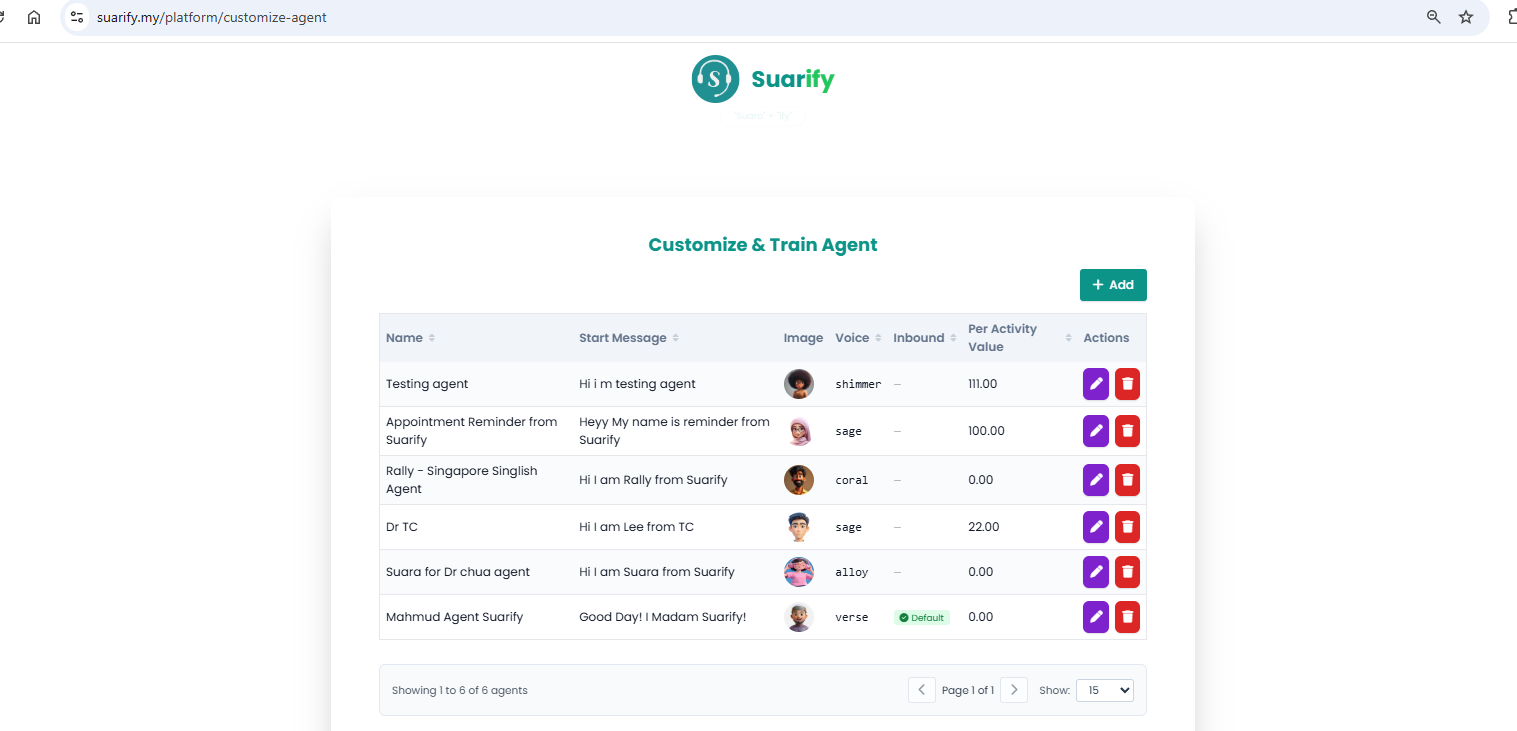
Step 1: Create Your AI Agent
The foundation of your sustainable calling system is your AI agent. This is where you define how your automated calls will sound, what they'll say, and how they'll handle conversations.
What Makes a Great AI Agent?
Agent Configuration Essentials:- Voice Personality: Choose from multiple voice options (shimmer, sage, coral, alloy, verse) to match your brand
- Start Message: Craft an engaging opening that sets the right tone
- Call Objectives: Define what you want to achieve (appointment setting, lead qualification, follow-up, etc.)
- Response Handling: Configure how the agent handles common questions and objections
- Conversation Flow: Set up natural dialogue paths for different scenarios
Pro Tips for Agent Creation:
1. Create Multiple Agents for Different Use Cases:
- Sales Agent: Focused on product demos and consultations
- Follow-up Agent: For post-meeting check-ins
- Appointment Reminder: Automated reminders for scheduled meetings
- Lead Qualification: Pre-qualify leads before sales team engagement
2. Test and Iterate:
- Start with one agent and test it on a small batch
- Refine messaging based on results
- Create variations for A/B testing
- Build a library of proven agent configurations
3. Personalize for Your Audience:
- Use language that resonates with your target market
- Match voice tone to your brand personality
- Include relevant context in start messages
- Adapt for different industries or customer segments
Time Investment: 5-10 minutes per agent Long-term Value: Reusable for unlimited callsStep 2: Upload Multiple Leads
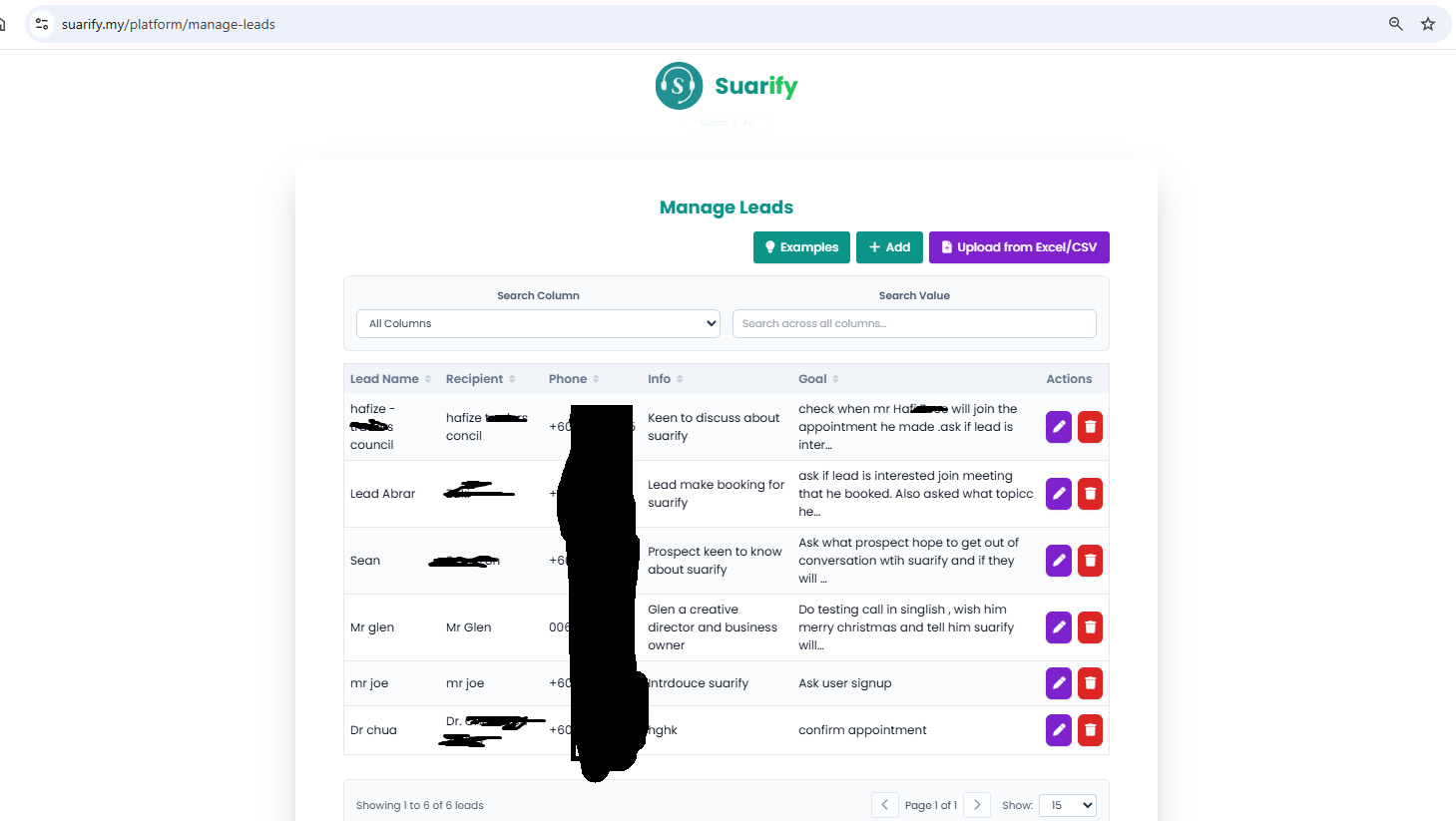
Once your AI agents are ready, the next step is preparing your lead database. Bulk lead management is what makes your automation truly scalable.
Lead Management Best Practices
Essential Lead Information:- Lead Name: Who you're calling
- Recipient Name: The actual person to speak with
- Phone Number: Correctly formatted with country code
- Lead Info: Context about the lead (interests, previous interactions, etc.)
- Call Goal: Specific objective for this call
Upload Methods:
1. Manual Entry: Perfect for small batches or testing
2. Excel/CSV Upload: Ideal for bulk imports from your CRM or spreadsheet
3. API Integration: Connect directly with your existing systems
Growth Hacks for Lead Management:
Hack 1: Segment Your Leads- Group leads by source (website, referral, event, etc.)
- Categorize by interest level (hot, warm, cold)
- Organize by industry or customer type
- Tag leads for different calling strategies
Hack 2: Enrich Lead Data- Add context from previous interactions
- Include relevant background information
- Note specific pain points or interests
- Track lead source for attribution
Hack 3: Maintain Lead Hygiene- Regularly update phone numbers
- Remove duplicates and invalid entries
- Tag leads based on call outcomes
- Build a clean, organized database
Time Investment: 2-5 minutes per batch upload Scalability: Handle thousands of leads simultaneouslyStep 3: Schedule Bulk Calls
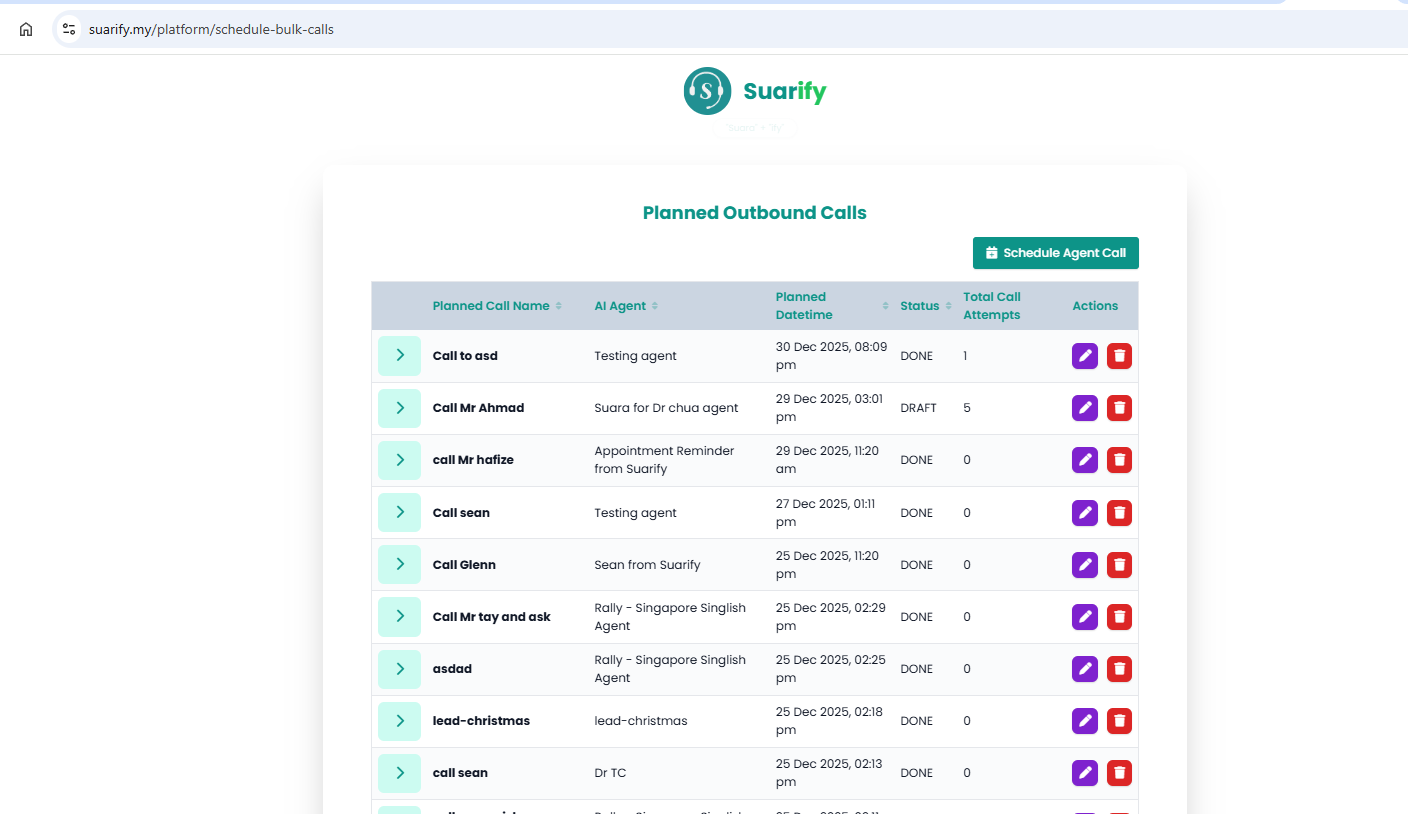
This is where the magic happens. Bulk call scheduling connects your agents with your leads and automates the entire calling process.
How Bulk Scheduling Works:
1. Select Your Agent: Choose which AI agent will make the calls
2. Choose Your Leads: Select the leads from your database
3. Set Schedule: Decide when calls should be made (immediate or scheduled)
4. Configure Settings: Set call attempts, retry logic, and timing preferences
5. Launch: Activate your automated calling campaign
Scheduling Strategies:
Strategy 1: Immediate Calls- Perfect for time-sensitive opportunities
- Instant engagement with hot leads
- Fast response to inquiries or events
- Maximum speed to conversion
Strategy 2: Scheduled Calls- Plan calls for optimal times
- Respect time zones and business hours
- Coordinate with other marketing activities
- Balance call volume for consistent outreach
Strategy 3: Drip Campaigns- Schedule multiple touchpoints over time
- Build relationships gradually
- Follow up automatically
- Nurture leads through the funnel
Advanced Automation Features:
- Smart Retry Logic: Automatically retry failed calls at optimal times
- Call Attempt Limits: Set maximum attempts per lead
- Time Zone Awareness: Respect local business hours
- Volume Control: Manage call frequency to avoid overwhelming leads
Time Investment: 2-3 minutes to schedule hundreds of calls Automation Power: Runs 24/7 without manual intervention📊 Step 4: Track Sentiment & Conversation Logs
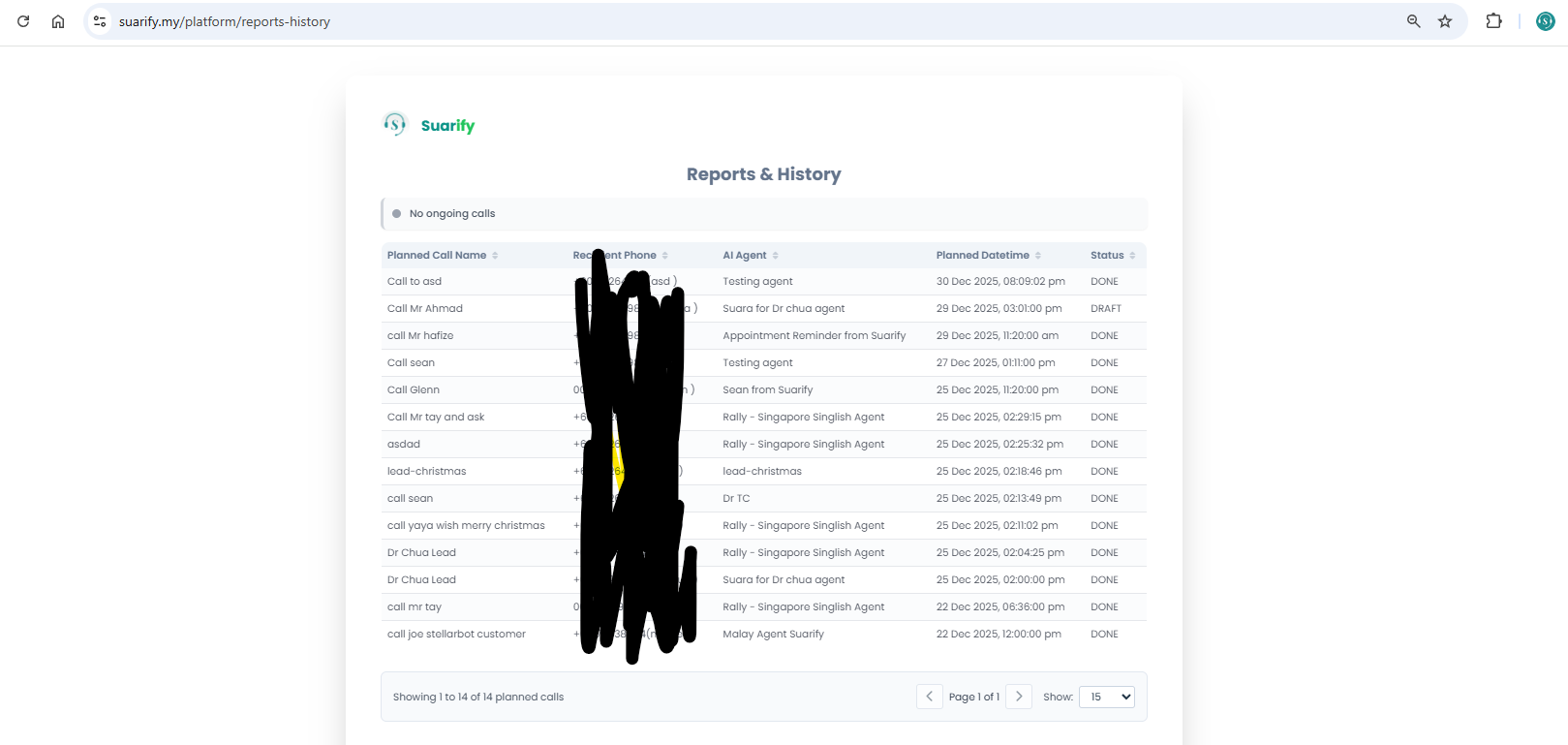
After your calls are scheduled and running, sentiment analysis and conversation logs provide the insights you need to optimize and improve your automation.
Sentiment Analysis: Understanding Call Outcomes
Sentiment reporting gives you real-time insights into how your calls are being received:- Positive Sentiment: Leads are engaged and interested
- Neutral Sentiment: Leads are listening but not fully committed
- Negative Sentiment: Leads are disinterested or have objections
How to Use Sentiment Data:
1. Optimize Agent Messaging:
- Identify which messages generate positive sentiment
- Refine messaging for neutral leads
- Address common objections from negative sentiment
2. Segment Your Leads:
- Prioritize positive sentiment leads for immediate follow-up
- Nurture neutral sentiment leads with additional touchpoints
- Re-engage negative sentiment leads with different approaches
3. Improve Conversion Rates:
- A/B test different agent configurations
- Track sentiment changes over time
- Optimize for higher positive sentiment scores
Conversation Logs: Complete Call Visibility
Conversation logs provide detailed transcripts and insights from every call:- Full Transcripts: See exactly what was said in each conversation
- Call Duration: Track how long conversations last
- Key Moments: Identify important points in conversations
- Outcome Tracking: See what was achieved in each call
Using Conversation Logs for Optimization:
1. Identify Patterns:
- Find common questions and objections
- Discover what messaging resonates
- Understand conversation flows that work best
2. Train Your Team:
- Share successful conversation examples
- Learn from effective agent interactions
- Improve manual calling based on AI insights
3. Refine Your Agents:
- Update agent configurations based on real conversations
- Add responses for common questions
- Improve conversation flow based on actual interactions
4. Quality Assurance:
- Monitor call quality and compliance
- Ensure consistent messaging
- Maintain brand standards
💡 Growth Hacks: Maximizing Your Automation ROI
Growth Hack 1: Multi-Agent Campaigns
Use different agents for different lead segments:
- High-Value Leads: Use your best-performing agent
- Cold Leads: Use a more exploratory agent
- Follow-ups: Use specialized follow-up agents
- Industry-Specific: Create agents tailored to specific industries
Result: 30-50% higher conversion rates through targeted messaging.Growth Hack 2: Time-Optimized Scheduling
Schedule calls based on data-driven insights:
- Best Answer Times: Schedule during hours with highest answer rates
- Time Zone Optimization: Call leads during their local business hours
- Day-of-Week Testing: Test different days to find optimal timing
- Seasonal Adjustments: Adapt schedules for holidays and events
Result: 40-60% improvement in answer rates and engagement.Growth Hack 3: Lead Scoring Integration
Combine automation with lead scoring:
- Hot Leads: Immediate calls with priority agents
- Warm Leads: Scheduled calls with nurturing agents
- Cold Leads: Lower-priority automated sequences
- Re-engagement: Special campaigns for inactive leads
Result: 2-3x better ROI by focusing on high-value opportunities.Growth Hack 4: Continuous Optimization Loop
Build a system of continuous improvement:
1. Monitor Performance: Track sentiment, conversion rates, and outcomes
2. Identify Opportunities: Find patterns and areas for improvement
3. Test Changes: A/B test new agent configurations and messaging
4. Implement Winners: Scale what works, eliminate what doesn't
5. Repeat: Continuously refine and optimize
Result: 10-20% improvement in key metrics every optimization cycle.⏱️ Time-Saving Tips for Maximum Efficiency
Tip 1: Build Agent Templates
Create reusable agent templates for common scenarios:
- Sales Templates: Pre-configured for different products or services
- Follow-up Templates: Standardized for post-meeting check-ins
- Industry Templates: Tailored for specific verticals
- Seasonal Templates: Adapted for holidays and special events
Time Saved: 5-10 minutes per campaign setup.Tip 2: Organize Leads with Tags
Use tags to organize and filter leads:
- Source Tags: Website, referral, event, etc.
- Status Tags: New, contacted, qualified, converted
- Segment Tags: Industry, company size, geographic region
- Custom Tags: Any categorization relevant to your business
Efficiency Gain: Instant filtering and selection for campaigns.Tip 3: Schedule Recurring Campaigns
Set up automated recurring campaigns:
- Weekly Follow-ups: Automatic check-ins with existing leads
- Monthly Nurturing: Regular touchpoints for long-term leads
- Event Reminders: Automated reminders for webinars and events
- Seasonal Campaigns: Pre-scheduled for holidays and promotions
Automation Benefit: Set once, run forever with zero ongoing effort.Tip 4: Use Bulk Actions
Leverage bulk actions for efficiency:
- Bulk Lead Import: Upload thousands of leads at once
- Bulk Agent Assignment: Assign agents to multiple campaigns
- Bulk Scheduling: Schedule hundreds of calls simultaneously
- Bulk Status Updates: Update lead statuses in batches
Productivity Increase: 10x faster than manual processes.🎯 Customer Value Proposition: Why This System Works
For Sales Teams
Before: Manual calling, limited reach, inconsistent results, high burnout After: Automated calling at scale, consistent quality, data-driven optimization, focus on closing Value: 5x more conversations with the same team size, 3x higher conversion rates.For Marketing Teams
Before: Limited ability to follow up on leads, manual outreach bottlenecks, poor attribution After: Automated lead nurturing, scalable outreach, complete attribution, measurable ROI Value: 10x lead engagement improvement, complete campaign visibility.For Business Owners
Before: High labor costs, limited scalability, inconsistent quality, difficult to measure After: Pay-per-call pricing, unlimited scalability, consistent quality, complete analytics Value: 80% cost reduction, unlimited growth potential, data-driven decisions.For Growth Teams
Before: Slow iteration cycles, difficult to test, limited scalability, high opportunity cost After: Rapid experimentation, easy A/B testing, instant scaling, measurable results Value: 10x faster growth cycles, data-driven optimization, sustainable scaling.🔥 Advanced Strategies for Sustainable Growth
Strategy 1: Multi-Touchpoint Automation
Combine bulk calling with other channels:
1. Email Sequence: Warm up leads with email
2. Bulk AI Calls: Follow up with automated calls
3. SMS Reminders: Send additional touchpoints
4. Second Call Wave: Re-engage based on sentiment
Result: 50-70% higher conversion rates through multi-channel engagement.Strategy 2: Predictive Lead Scoring
Use automation data to predict lead quality:
- Call Outcome Patterns: Identify leads likely to convert
- Sentiment Trends: Track lead engagement over time
- Response Timing: Optimize follow-up timing
- Conversion Predictors: Focus on high-probability leads
Impact: 2-3x better ROI by prioritizing the right leads.Strategy 3: Seasonal Campaign Automation
Pre-schedule campaigns for key periods:
- Holiday Campaigns: Automated outreach for special occasions
- Event-Based: Coordinate with trade shows and webinars
- Product Launches: Automated sequences for new offerings
- Renewal Campaigns: Automated reminders for renewals
Advantage: Never miss an opportunity with pre-planned automation.📊 Real-World Success Stories
Case Study 1: Real Estate Agency
Challenge: Following up on property inquiries manually was impossible at scale. Solution: Created agents for different property types, uploaded leads from website, scheduled bulk calls. Results:- 300% increase in viewing appointments scheduled
- 80% reduction in manual follow-up time
- Consistent engagement across all leads
Case Study 2: SaaS Company
Challenge: Demo requests were piling up, sales team couldn't keep up. Solution: Created qualification agent, uploaded demo requests, scheduled immediate calls. Results:- 5x more demos booked per week
- 90% reduction in no-shows (better qualification)
- Faster sales cycle through immediate engagement
Case Study 3: Healthcare Practice
Challenge: Appointment reminders and follow-ups were time-consuming. Solution: Created reminder agent, uploaded patient database, scheduled recurring calls. Results:- 60% reduction in no-shows
- 40% increase in patient retention
- Complete automation of reminder system
🚀 Getting Started: Your First Sustainable Automation
Ready to build your sustainable outbound AI calling system? Here's your action plan:
Week 1: Foundation
1. Create Your First Agent (Day 1)
- Choose voice and personality
- Write start message
- Define call objectives
- Test on a few calls
2. Upload Your First Leads (Day 2)
- Prepare lead list (50-100 leads)
- Format phone numbers correctly
- Add relevant context
- Import into system
3. Schedule Your First Campaign (Day 3)
- Select agent and leads
- Set schedule
- Launch campaign
- Monitor initial results
Week 2: Optimization
4. Analyze Results (Day 4-5)
- Review sentiment reports
- Read conversation logs
- Identify patterns
- Find improvement opportunities
5. Refine and Scale (Day 6-7)
- Update agent based on insights
- Add more leads
- Schedule larger campaigns
- Build momentum
Week 3+: Scale and Automate
6. Build Your System
- Create multiple agents for different use cases
- Organize leads with tags and segments
- Set up recurring campaigns
- Build sustainable processes
7. Continuous Improvement
- Monitor performance weekly
- Test new approaches monthly
- Scale what works
- Eliminate what doesn't
💬 The Bottom Line
Sustainable outbound AI automation isn't about replacing human sales teams — it's about amplifying their impact:- ✅ 3 Simple Steps: Create agent → Upload leads → Schedule calls
- ✅ Complete Automation: Runs 24/7 without manual intervention
- ✅ Full Visibility: Sentiment reports and conversation logs for optimization
- ✅ Unlimited Scalability: Handle thousands of calls without hiring more staff
- ✅ Data-Driven: Make decisions based on real performance data
The outcome? A calling system that grows with your business, saves time, reduces costs, and delivers consistent results — all while your team focuses on what they do best: building relationships and closing deals.Whether you're a sales leader looking to scale your team's reach, a marketer seeking better lead engagement, or a business owner wanting to automate customer communication, Suarify's 3-step automation framework gives you the sustainable system you need.
Start building your sustainable automation today: suarify.my/platform---
*Ready to transform your outbound calling into a sustainable, scalable system? Follow these 3 simple steps and watch your automation handle the rest.*